Choose a small section
Tap a measure or select a short range. The reader fits readable music to your screen; printing keeps its own page layout.
From sheet music to focused practice
Hear a section, separate the hands, slow the tempo and loop the part that needs attention. A readable score is the start of a practice session.
Authorized MusicXML works today. No photo or recording needed to try piece practice.
Try it at your piano
A useful first session
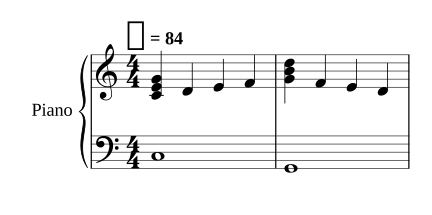
Try the two-measure sample above. Hear it once, practice each hand, then bring them together at a comfortable tempo. In the app, select your range and return to that musical place later.
Tap a measure or select a short range. The reader fits readable music to your screen; printing keeps its own page layout.
Use right hand, left hand or both, adjust tempo, and loop. Add note help and fingerings when they are useful.
Finish your session and come back to your piece. Your practice history and saved context belong to your profile.
Photo import · launch validation
We are preparing photo import for piano grand staff, and piano-vocal scores with the vocal line discarded.
The recognized notes, rhythm and measures must hold up on real photos. The result must look clear and sound faithful in the app. Synthetic test scores help us find errors; they do not establish real-photo readiness.
Photo import is not yet declared launch-ready. Melody-only recognition does not meet the full piano launch requirement. Recording import is outside this launch.
See the dated development evidence →Use music you own or are authorized to import. The proposed supported layout is piano grand staff, including piano-vocal material where only the piano staves are retained. Supported scope and capture guidance will be explicit at launch.
AI recognition can miss or misread music. Compare uncertain measures with the source, listen, and report the problem. Repair and refund behavior must pass launch acceptance; do not assume an unreported error means the score is correct.
Plus includes a monthly allowance; optional purchased packs are separate. Exact per-piece limits are being checked against processing and retry costs before paid activation. See the proposed prices.
Use the included sample or import authorized MusicXML. You can also work through foundations practice bites without uploading any music.